Images for your posts, made and attached by AI
Describe the picture you want. Your AI makes a few versions in RobinReach, looks at them, attaches the best one to your post and keeps the others in your media library.
- Your AI
- AI images
- The right image, already attached
Make an image for Friday's Instagram post: our speckled mugs on a linen tablecloth, soft morning light, portrait. Try a few and attach the best one.
- Checked your AI image allowance
- Made 4 versions from your description
- Looked at all four and picked the closest
- Attached it to Friday's Instagram post
I made four versions and attached the one with the softest light to Friday's post. The other three are in your media library if you'd rather swap. That used 4 of your 50 AI images this month.

 RobinReachMedia library
 Clay & Co.
Speckled stoneware mugs on a linen tablecloth, soft morning light, portrait
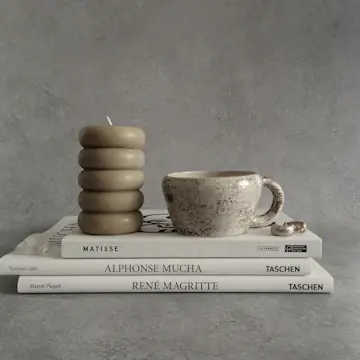
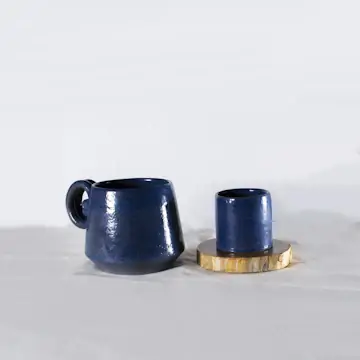
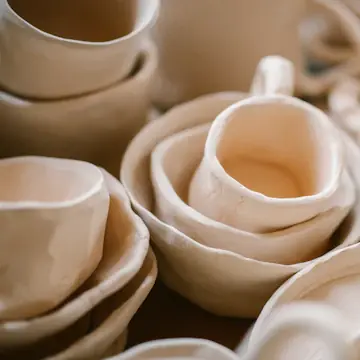
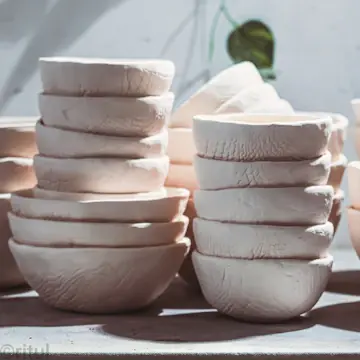
An example conversation with an invented brand. Photos from Unsplash stand in for AI images.
What your AI uses to do it
Your assistant brings the thinking and the writing. RobinReach gives it hands: these are the parts of RobinReach it works with to get this done.
-
Your AI assistant
Claude, ChatGPT, Gemini, Codex or Cursor. You brief it the way you would brief a person, and it decides which RobinReach actions to take, in what order.
Connect yours in two minutes -
AI images
Makes images from your description in the shape and style you ask for, saves every version to your media library and attaches the one you want to a post.
Learn more -
The right image, already attached
How it works
What happens between your message and the result. The small labels are the RobinReach actions your AI calls, in case you are curious.
-
Connect your AI to RobinReach, once
Add RobinReach to Claude or ChatGPT as a connector with one link, click Connect and sign in to RobinReach. There is no API key to copy. Other assistants use the link with your API key, from Integrations in RobinReach. It takes about two minutes and you never repeat it.
-
Checked your AI image allowance
Your plan includes a monthly allowance of AI images. Your AI checks what's left before it starts.
-
Made 4 versions from your description
Each one is saved to the RobinPixel folder of your media library. Images come in five shapes and six styles, made with OpenAI's GPT Image or Google's Gemini.
-
Looked at all four and picked the closest
Your AI sees the images themselves, so it can choose the one that matches what you asked for.
-
Attached it to Friday's Instagram post
The chosen image goes straight onto the post. The other three wait in your library.
-
Check it in RobinReach
Everything your AI did is in RobinReach: the calendar, the posts and their status. Edit, move or delete anything from there.
Copy the prompt
Paste it into your assistant and change the details to fit your brand.
Make an image for Friday's Instagram post: our speckled mugs on a linen tablecloth, soft morning light, portrait. Try a few and attach the best one.
More ways to ask
Copy one, paste it into Claude or ChatGPT, and swap in your own details.
-
Make a square image for tomorrow's post about our autumn menu: warm colours, wooden table, no text.
-
Try the same image with Google's Gemini and show me both.
-
Make a 16:9 image for our LinkedIn post about the new studio, vintage style, in our brand colours.
-
Replace the image on Saturday's post with a new one: same idea, brighter.
-
How many AI images do we have left this month?
What it does, and what it doesn't
- Every image is saved to the RobinPixel folder of your media library and shows in Recent images on the RobinPixel page, so you can reuse it in other posts or on your Bio Page.
- Choose the shape (1:1, 16:9, 4:3, 9:16 or 3:4), a style (realistic, cartoon, anime, abstract, vintage or futuristic), extra guidelines such as brand colours, and OpenAI's GPT Image or Google's Gemini. Your AI picks sensible defaults if you don't say.
- AI images count toward your plan's monthly allowance: 50 a month on Bloom. If you run out, your AI can search free Unsplash photos instead.
- Images only. RobinReach doesn't generate videos.
- Prefer to make images yourself? RobinPixel does the same in the RobinReach dashboard, and adds 2K and 4K resolution. Images your AI makes come at standard resolution.
Start smaller, or stack one more feature
Every use case is a recipe of RobinReach features. These share some of this one's.




Related
Captions for your photos
Your AI looks at each photo in a folder and writes a caption and alt text that match it.
+ Media library 1 feature See how it works Essential
Write in your brand voice
Your AI studies your past posts, remembers your corrections and writes like you on every network.
+ Brand voice 1 feature See how it works Essential

Get a weekly report from AI
This week against last week, your best posts and a clear next step, in plain words.
+ Analytics 1 feature See how it worksFrom the blog
Frequently asked questions
Can ChatGPT make images for my Instagram posts?
Which image models can it use?
How many images can I make?
Can it put text on the image?
Which RobinReach plan do I need for this?
Never post without an image again
Connect Claude or ChatGPT to RobinReach once and ask for the picture you need. Included in Bloom, Thrive and Scale.