How to Manage Social Media with ChatGPT and Claude (Posting, DMs and Analytics)
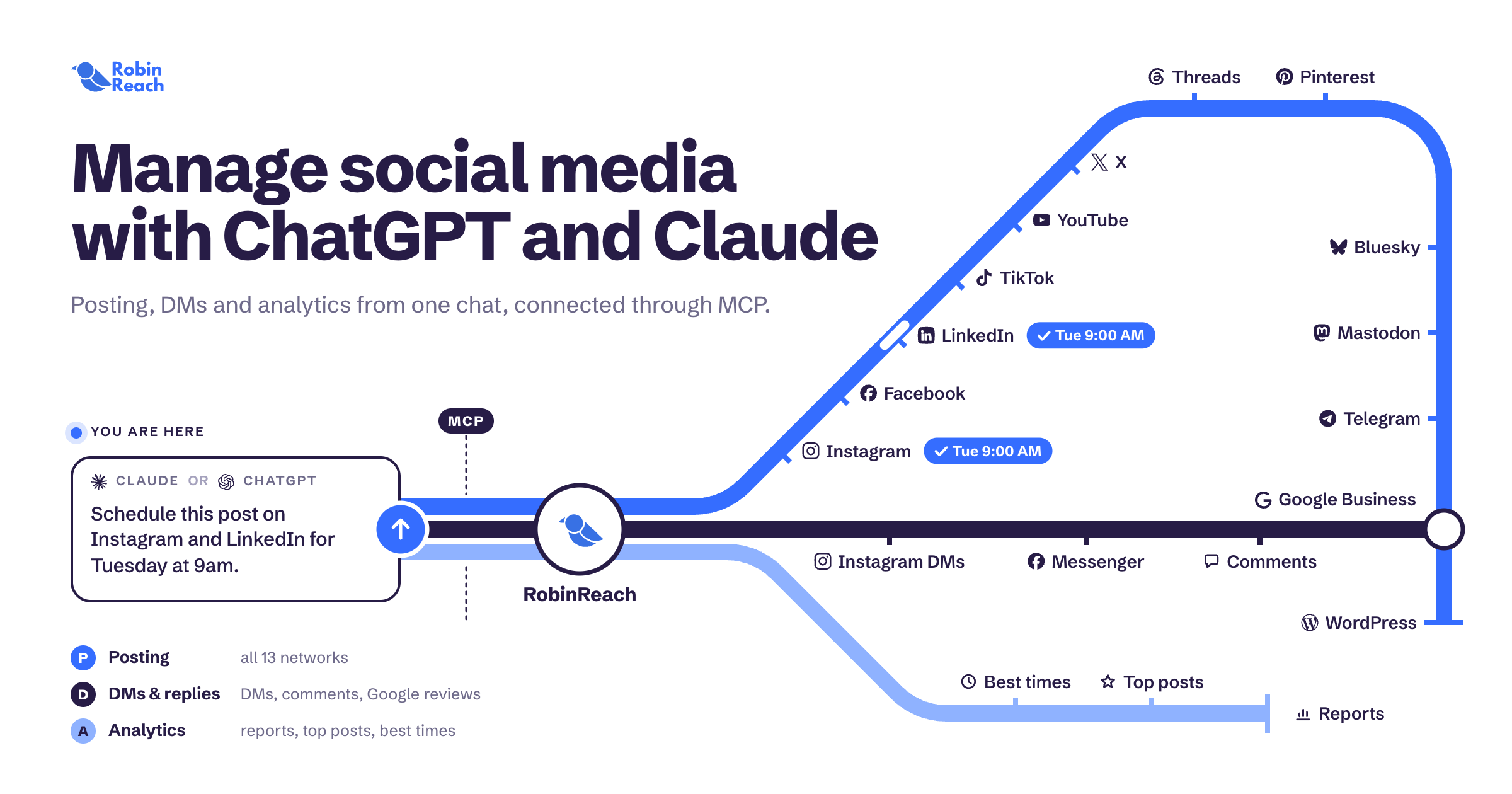
You can manage your social media with ChatGPT or Claude by connecting them to a social media tool through MCP (Model Context Protocol). Once connected, your AI assistant can schedule posts, reply to Instagram and Facebook DMs, answer comments and Google reviews, and pull analytics from a single chat.
The quick version
- Sign up for a social media tool that supports MCP, like RobinReach.
- Connect your Instagram, Facebook, LinkedIn, TikTok, YouTube and other accounts.
- Add the RobinReach connector in Claude or ChatGPT.
- Ask in plain English: "Schedule this post on Instagram and LinkedIn for Tuesday at 9am."
- Your assistant does it, using your real accounts.
The rest of this guide covers setup, the prompts that work best, and the mistakes that get brands in trouble.
Why ChatGPT on its own can't run your social media
Out of the box, ChatGPT and Claude are writers, not operators. They can draft a great caption, but then you still copy it, open Instagram, paste it, pick a time, and repeat for every platform.
They also can't see anything. They don't know what you posted last week, which post flopped, or that three customers messaged you overnight.
MCP fixes that. It's an open standard that lets AI assistants securely use other apps. Connect a social media tool that supports MCP and your assistant can:
- See your connected brands and accounts
- Create, schedule and publish posts
- Read and reply to comments, DMs and reviews
- Pull real performance data
You stay in control. The assistant only acts on what you ask, using the accounts you connected.
How to connect Claude or ChatGPT to your social accounts
Setup takes about five minutes.
Step 1: Connect your social accounts to RobinReach
Create a brand in RobinReach and connect the profiles you manage: Instagram, Facebook, LinkedIn, TikTok, YouTube, Pinterest, Threads, Google Business Profile and more. Agencies can send clients a Connect Link so they never have to share passwords.
[Screenshot: connecting accounts]
Step 2: Add RobinReach to Claude
In Claude, open Settings, go to Connectors and add a custom connector with this URL:
https://robinreach.com/mcp/v1/messagesSign in to RobinReach when prompted and approve access. [confirm exact steps]
Step 3: Add RobinReach to ChatGPT
In ChatGPT, open Settings, go to Apps and Connectors and add RobinReach using the same URL. [confirm exact steps and plan requirements]
Step 4: Test it
Ask: "List my RobinReach brands and connected accounts." If you see your profiles, you're ready.
20 ChatGPT and Claude prompts for social media management
Copy these, swap in your details, and go.
Planning and posting
- "Plan next week's content for [brand]: 5 posts for Instagram, 3 for LinkedIn. Show me the drafts before scheduling."
- "Turn this blog post into an Instagram caption, a LinkedIn post and a thread: [URL]."
- "Schedule these posts at each platform's best posting time based on my past engagement."
- "Find the next empty day on my calendar and fill it with a post about [topic]."
- "Learn my brand voice from my last 30 posts and use it for everything you write."
- "Find a stock photo of [subject] and attach it to tomorrow's Instagram post."
- "Move every post scheduled for Friday to Monday at the same times."
DMs, comments and reviews
- "Check my Instagram and Facebook DMs from today and reply to anyone asking about pricing. Draft first, then send when I approve."
- "Summarize every unanswered message across my brands and flag anything urgent."
- "Reply to all new comments on my last 3 posts. Thank compliments, answer questions, skip spam."
- "Respond to new Google reviews. Thank 5-star reviewers by name and apologize and offer help on anything under 3 stars."
- "Like every positive comment on today's post."
Analytics and reporting
- "How did this week compare to last week? Keep it to 5 bullet points."
- "What were my top 5 posts this month and what do they have in common?"
- "Which platform drives the most engagement for [brand]?"
- "When does my audience engage most on Instagram?"
- "Write a one-page monthly report for my client [brand]."
Agencies and multiple brands
- "For each of my brands, tell me which one has no posts scheduled in the next 7 days."
- "Create an approval link for next week's [client] posts so they can review them."
- "Find any posts that failed to publish this week and tell me why."
Automations that run without a prompt
Some work shouldn't wait for you to open a chat. Set it up once and it runs on its own.
- Comment to DM. When someone comments a keyword like "PRICE" on your Instagram or Facebook post, they automatically get a DM with the link. Great for launches and lead magnets.
- RSS to posts. New blog articles turn into draft social posts automatically.
- Content repurposing. Repost content from one profile to others on a schedule.
- Webhooks. Get a Slack alert when a post fails, route new DMs to your helpdesk, or push events into your own dashboards.
Use your AI assistant to set these up too: "Create a comment-to-DM automation on my Instagram that sends our pricing link to anyone who comments PRICE."
5 mistakes to avoid
- Letting AI send DMs unchecked on day one. Start with "draft first, then send." Switch to auto-send once you trust the replies.
- Missing Meta's 24-hour window. Instagram and Facebook only allow standard replies within 24 hours of a customer's last message. Check DMs daily.
- Posting the same caption everywhere. Ask for platform-specific versions. LinkedIn and TikTok audiences don't want the same post.
- Skipping brand voice. Have the assistant learn from your past posts first, or everything will sound generic.
- Never checking the numbers. Ask for a weekly performance summary and let it shape next week's plan.
FAQ
Can ChatGPT post to Instagram?
Not on its own. Connect ChatGPT to a social media tool with an MCP connector, like RobinReach, and it can create, schedule and publish Instagram posts for you.
Can ChatGPT or Claude reply to Instagram DMs?
Yes, through RobinReach MCP. Your assistant can read Instagram and Facebook DMs and send replies from your connected account, within Meta's 24-hour reply window.
Is Claude or ChatGPT better for social media?
Both work with RobinReach. Use whichever one you already pay for and like writing with.
Is it safe to connect AI to my social accounts?
The assistant only gets access through the connector you approve, and it acts only when you ask. You can remove access at any time.
Which platforms does it work with?
Instagram, Facebook, LinkedIn, TikTok, YouTube, Pinterest, Threads, Google Business Profile and more. [confirm full list]
Do I need to code?
No. Setup is a few clicks, and everything after that is plain English.
Start managing social media with AI
Connect your accounts, add RobinReach to Claude or ChatGPT, and send your first prompt in under five minutes.