How RobinReach Engage Solves the Social Media Comment Management Problem
Social media teams lose more time in the reply workflow than most people realize.
You publish a post, then the real work starts. A tab for Facebook notifications. Another for LinkedIn. A third for whatever platform you tried last month. Comments stack up. Some get replies. Many do not. By the time you circle back, the moment has passed and the conversation has gone cold.
This is not a discipline problem. It is a tool problem. And it is exactly what we built Engage to fix.
The hidden cost of fragmented social media engagement
Most social media tools solve for publishing. Scheduling, drafting, approvals, calendar views. That part of the workflow is well-served.
Engagement is different. When someone comments on your post, there is no centralized place to see it, no queue to work through, no way to tell what has been handled and what has not. You rely on platform notifications, which are inconsistent, and manual checking, which is slow.
The real cost is not just time. It is momentum.
Research consistently shows that response speed correlates with engagement rate. When a comment gets a reply within minutes, the algorithm sees activity, the commenter continues the conversation, and others feel safe to join in. Wait a few hours and that window closes. The comment sits unanswered and the signal fades.
For teams managing multiple accounts across multiple platforms, the gap between what is possible and what actually happens can be significant. Not because the team is not trying, but because the current tooling makes fast, consistent engagement genuinely difficult.
What Engage does
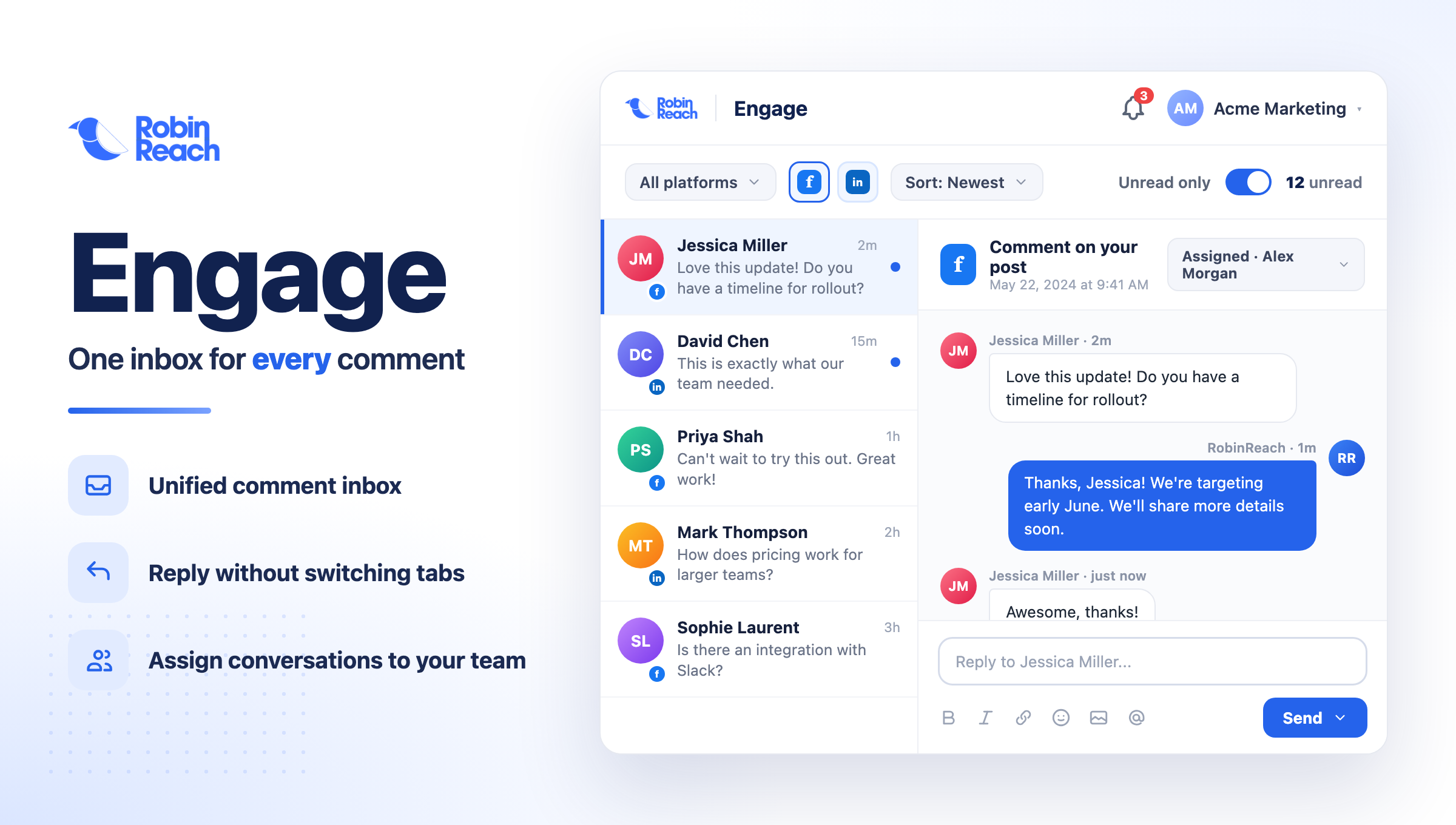
Engage is a unified community inbox built directly into RobinReach. It pulls comments from your connected social platforms into a single, organized view so your team can read, respond, and track conversations without switching tabs.
The core workflow is simple:
One inbox for all comments. Facebook and LinkedIn comments appear together, sorted by time, with full context. You see the post they are responding to, the commenter's name, and the full thread.
Reply from inside RobinReach. No need to open the platform. You can draft and send replies directly from the inbox. Replies post to the correct platform and appear in the thread immediately.
Conversation tracking. Comments stay visible after you reply. You can see what was sent, when, and by whom. No more wondering whether a comment was handled.
Real-time updates. New comments surface as they arrive so your team can respond while conversations are still active.
AI-assisted replies with Claude
The most significant capability in Engage is not the inbox itself. It is what AI can do inside it.
RobinReach uses Claude, Anthropic's AI model, to help draft replies to incoming comments. When you open a comment, Claude can suggest a response based on the content of the comment, the original post, and your brand's tone.
This is meaningful for a few reasons.
Speed without sacrificing quality. Writing individual replies to dozens of comments is tedious work. AI drafts give you a strong starting point that you can review and edit in seconds rather than composing from scratch every time.
Consistent brand voice. For teams with multiple people handling engagement, maintaining a consistent tone across hundreds of replies is difficult. Claude drafts to a consistent standard, which your team can then personalize.
Practical for repetitive engagement. A large share of social comments fall into recognizable categories: thank-you messages, common questions, feedback, requests for more information. AI handles these patterns well, which frees your team for conversations that actually need human judgment.
One important point: AI replies in Engage are suggestions, not automations. Every draft requires review and approval before it goes live. The AI accelerates your team's work, it does not replace their judgment.
Teams using Engage in early access have reported cutting average reply time by up to 60 percent on high-volume content. The biggest gains tend to come from FAQs and routine engagement, where the drafts need minimal editing.
Claude MCP integration: AI that can actually act on your behalf
Beyond AI-assisted drafting, Engage ships with native support for Claude's Model Context Protocol (MCP).
This means Claude can not only suggest replies inside the RobinReach interface, it can also connect directly to your Engage inbox as a tool. If you use Claude in your workflow, you can ask it to review recent comments, draft responses, identify patterns in your engagement, or flag messages that need attention, and it can actually do those things rather than just describe them.
This kind of native AI integration is relatively new in social media tooling. Most AI features sit on top of existing workflows as overlays. MCP integration means Claude has structured access to your inbox data and can operate as a genuine workflow participant, not just a writing assistant.
For teams already using Claude for content strategy, research, or customer communication, this creates a continuous context: the same AI understanding your brand can also be handling or supporting your engagement workflow.
Why engagement is a growth signal, not just a support task
There is a framing problem in how most teams think about comment management. It gets treated as reactive maintenance: something to clean up after the real work is done.
The data tells a different story.
Platforms like Facebook and LinkedIn use engagement velocity as a key input into content distribution. A post that generates active back-and-forth in the comments shows the algorithm that people find it worth responding to. That increases reach. More reach brings more comments. The cycle compounds.
Responding quickly also builds trust in a way that is visible to everyone who sees your content. When potential customers see that you actually engage with your community, it signals that your brand is present and responsive. That matters more in buying decisions than most marketing teams account for.
Engage does not manufacture engagement. But it removes the friction that causes teams to respond slowly or inconsistently, which is often the actual barrier between good content and good community.
Current platform availability
Engage currently supports:
- Facebook (pages and profiles)
- LinkedIn (company pages and personal profiles)
Instagram, X, and additional platforms are in active development. We are building rollout priority based directly on user demand, so if there is a platform you need, telling us accelerates that timeline.
What is coming next
Engage is an early version of a larger vision for how teams should manage social media conversations.
On the near-term roadmap:
Direct message inbox. Comments are the visible part of engagement. DMs are where higher-intent conversations happen. We are building unified DM support across platforms.
Team collaboration. Assigning comments to team members, internal notes on conversations, and shared response templates for brand voice consistency.
Deeper AI customization. The ability to train Claude reply suggestions on your specific brand voice, product terminology, and common conversation patterns.
Multi-platform expansion. Instagram comments and DMs, X replies, and potentially YouTube comments as platforms mature in our integration roadmap.
We are shipping updates on a short cycle and incorporating feedback from active users into every release.
Who Engage is built for
RobinReach built Engage for teams that take community seriously but are constrained by time and tooling.
That includes solo founders managing their own social presence, small marketing teams handling multiple brand accounts, agencies managing engagement across client portfolios, and growth-stage companies whose content is starting to generate real volume.
If you are at a stage where engagement is becoming a meaningful part of your workflow and the current tab-switching approach is starting to break down, Engage is designed for exactly that inflection point.
How to get started
If you are an existing RobinReach user, Engage is available in your dashboard under the Engage tab. No setup required.
If you are new to RobinReach, you can start free at robinreach.com and access Engage immediately as part of your account.
The dedicated Engage page at robinreach.com/en/engage has more detail on features and platform support.
Managing social media engagement does not have to mean scattered tabs and slow replies. Engage brings all of it into one place, with AI that can actually help move faster without losing the human touch that makes community feel real.